Plugins
Planish
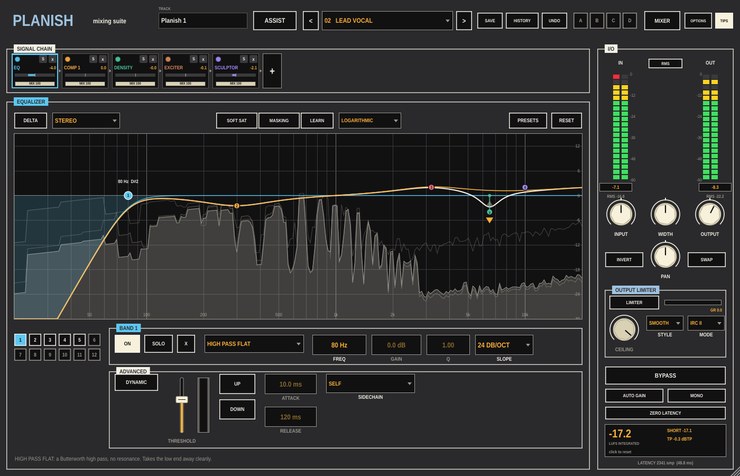
A mixing suite for Ableton Live, built as a VST3 audio effect.
Version 0.1.0.
Planishing is the hammering that smooths a piece of metal before it is
burnished. Planish is for the tracks of a mix, as
Burnish is for the master: eleven modules on one
channel strip, in any order, each with its own wet/dry mix. Put one on
every track and they talk to each other: the equaliser shows where two
tracks fight over the same frequencies, and a mixer page sets the level,
pan and width of all of them at once.
If you'd rather not build the chain yourself, ASSIST listens to the
track, works out whether it's a vocal, a kick, a bass or something else,
and builds one for it. Across the whole song, the MIX ASSISTANT listens to
every track and sets a starting balance.
What it does
- Signal chain
- One tile per module, in signal order. Drag to reorder, click to open,
solo or switch off any of them, and turn each one's MIX down for parallel
processing. A meter on each tile shows how much that module is changing
the level.
- Equalizer
- Twelve bands and thirteen filter shapes, any of which can turn
dynamic: moving up or down with the level, from its own input or a
sidechain. Its masking meter compares this track with another and marks
where they collide, and can cut one where the other boosts.
- Dynamics
- A three-band gate with hysteresis; two compressors (punch, modern and
vintage, with upward ratios, adaptive release and a sidechain per band);
a transient shaper; and Density, slow upward and downward compression to
even out a part.
- Colour
- An exciter with eight kinds of saturation blended on an XY pad per
band, oversampled, with a filter on what it adds; and an oversampled
multiband clipper.
- Spectral
- Sculptor moves the track toward a tonal target for its instrument (or
one learnt from a reference). Unmask ducks only the bands where another
track, on the sidechain, is playing: room for a vocal without a fixed
cut.
- Phase
- Rotate the phase and nudge the timing by fractions of a sample to line
a track up against another (two mics on one source). LEARN finds both.
- Channel modes
- Most modules work in stereo, mid/side, or split into transients and
sustain, with separate settings for each half.
- Visual Mixer
- Every Planish in the set as a node on one pad: drag for level and pan,
pull the handles for width, three snapshots of the whole mix. The MIX
ASSISTANT sets each group (voices, bass, percussion, the rest) against the
part you choose as the focus.
- I/O
- Peak with RMS or short-term loudness meters, width and pan, an output
limiter with four modes, auto gain for fair bypass comparisons, MONO and a
zero-latency switch for tracking.
Every control is a host parameter. Fifteen factory chains, presets for
each module, a named undo history, and four sets for A/B comparisons.
Video
Walkthrough video — not up yet.
Documentation
- Guide (PDF)
— a tour of the panel, a first mix in Live, ASSIST, every module in
turn, linking tracks with the masking meter and Unmask, and the Visual
Mixer.
Every control is also described in the
project README.
Download
Builds are on the
releases page.
Every archive includes the guide. VST3 only — there is no Audio Unit
build, so Planish will not load in Logic.
Installation notes are on the front page.
Source
github.com/taddeimania/planish
— C++ and JUCE, AGPLv3.