Plugins
Nave
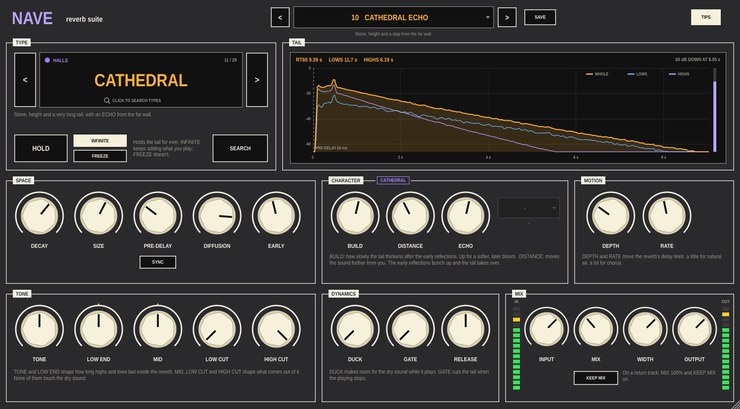
A reverb suite for Ableton Live, built as a VST3 audio effect.
Version 0.1.0.
Twenty-nine reverb types, from the air around a dry vocal to a
cathedral, with plates, springs, clouds, shimmer, a choir, gated and
reverse shapes, tape echo and tails tuned to a key. Find one by typing
what you want, shape it with the same set of knobs whatever it is, and
watch the actual tail you've made on the display. Put it on a track, or
on a return track at 100% wet.
What it does
- Types
- Rooms (Ambience, Studio Room, Live Room, Drum Room, Club, Chamber,
and Reflections, where you move the sound around a small room), halls
(Small Hall, Concert Hall, Arena, Cathedral), three plates, two springs,
ambient types (Cloud, Bloom, Shimmer, Halo, Abyss an octave down, Choir,
Swell) and special ones (Nonlinear, Gated, Reverse, Tape Echo, Lo-Fi, and
Resonant, which rings on a note and chord).
- Search
- Click the type and start typing: a name, a place, a use or a sound.
"Dark", "drums", "80s", "church" and "octave" all find something. The
same search box finds presets, yours included.
- Shaping
- DECAY, SIZE, PRE-DELAY (synced to the tempo if you like), DIFFUSION
and EARLY reflections. TONE and LOW END set how long the highs and lows
last; MID, LOW CUT and HIGH CUT shape what comes out. DEPTH and RATE move
the tail. DUCK pulls the reverb down while you play, GATE cuts it when you
stop, and WIDTH sets how wide it is.
- Character
- Up to three knobs and a choice that belong to the type you've picked:
BUILD and DISTANCE in the rooms and halls, the intervals of the shimmer,
the choir's vowel, how many springs and how hard they're driven, the tape
echo's heads and wow, the shape of a nonlinear tail.
- Tail display
- Every time you change something, Nave measures the impulse response
of the settings you have and draws it: the whole tail, its lows and its
highs, with their decay times.
- Hold
- HOLD stops the tail decaying. INFINITE keeps adding what you play;
FREEZE seals it so you play over it.
No added latency. Every type sits at about the same loudness, so
switching between them compares sounds rather than levels. Every knob,
button and choice is a host parameter. 33 factory presets, two of them
made for return tracks, and you can save your own.
Video
Walkthrough video — not up yet.
Documentation
- Getting started (PDF)
— Nave on a track and on a return, finding a type, shaping it,
ducking and gating, HOLD, a tour of the panel and all twenty-nine types.
Every control is also described in the
project README.
Download
Builds are on the
releases page.
Every archive includes the getting started guide. VST3 only — there
is no Audio Unit build, so Nave will not load in Logic.
Installation notes are on the front page.
Source
github.com/taddeimania/nave
— C++ and JUCE, AGPLv3.