Plugins
Mottle
A color and texture effect for Ableton Live, built as a VST3 audio
effect. Version 0.1.0.
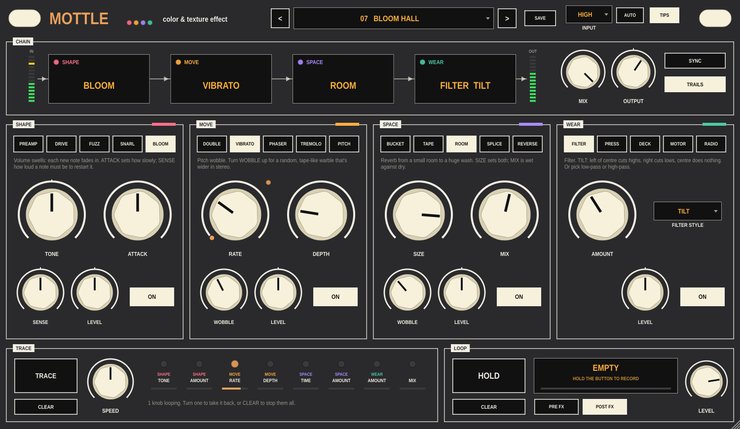
Four modules wired one after another, five effects in each: SHAPE
drives and fuzzes, MOVE modulates, SPACE echoes and reverberates, and WEAR
filters, squashes and wears the sound down. Drag the modules into any
order. Put it on an audio track, a group or a return track.
What it does
- Shape
- PREAMP, DRIVE, FUZZ, SNARL (fuzz into a resonant filter that opens as
you play harder) and BLOOM (volume swells). TONE darkens or brightens and
changes how each one breaks up.
- Move
- DOUBLE, VIBRATO, PHASER (2 to 12 stages), TREMOLO and PITCH, an octave
down to an octave up.
- Space
- BUCKET, a dark echo that runs away near the top; TAPE; ROOM, from a
small room to a long wash; SPLICE, a short loop that bends in pitch when
you change its length; and REVERSE, at half to double speed.
- Wear
- FILTER (tilt, low-pass or high-pass), PRESS, a heavy compressor; DECK,
a worn cassette; MOTOR, where the pitch sags now and then; and RADIO,
crackle, stutters and crushed bits.
- Wobble
- Each modulation and echo effect has a knob that makes it less
stable in its own way: drifting pitch, worn tape, double-speed passes,
lo-fi grit.
- Input
- Four headroom settings set where the drives start to break up, so a
quiet bass and a loud synth behave alike. AUTO listens for three seconds
and picks one.
- Trace
- Press TRACE, turn some knobs, press it again, and each knob you turned
loops what you did. Playback follows Live's tempo. Recordings are saved
with the set.
- Loop
- Hold to record up to 30 seconds, let go to loop it. A take under about
a second holds as a pad instead. Record before or after the effects.
Every knob, effect choice and the module order is a host parameter, and
so is the loop's HOLD, so it can go on a MIDI pad. 24 factory presets,
and you can save your own.
Video
Walkthrough video — not up yet.
Documentation
- Getting started (PDF)
— putting Mottle on a track in Live, setting INPUT, the twenty
effects, a tour of the panel, and TRACE and LOOP.
Every control is also described in the
project README.
Download
Builds are on the
releases page.
Every archive includes the getting started guide. VST3 only — there
is no Audio Unit build, so Mottle will not load in Logic.
Installation notes are on the front page.
Source
github.com/taddeimania/mottle
— C++ and JUCE, AGPLv3.