Plugins
Lacquer
A mastering assistant for Ableton Live, built as a VST3 audio effect.
Version 0.1.1.
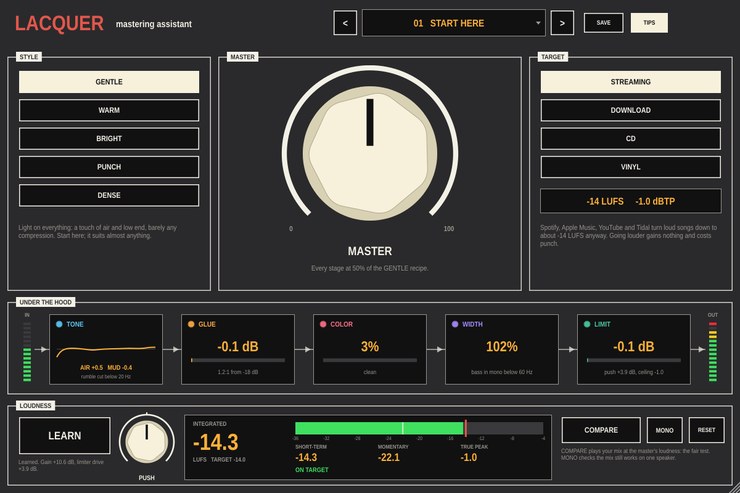
Pick a style, pick where the song is going, press LEARN and play the
song. Lacquer sets the loudness so the master lands on the target without
a peak going over, and one MASTER knob sets how much EQ, compression,
saturation and stereo width goes on alongside. It goes last on the master
channel.
It's also meant for learning. A strip along the middle shows what each
stage is doing to the track while it plays, and clicking a stage switches
it off so you can hear what it was adding.
What it does
- Style
- GENTLE, WARM, BRIGHT, PUNCH or DENSE. Each is a recipe for all five
stages: how much low end and air, how hard and how fast the compressor
works, how much saturation, how much width.
- Master
- How much of the recipe to use, on every stage at once. At 0 nothing is
shaped and only the loudness is set.
- Target
- Streaming (-14 LUFS, -1 dBTP), download (-11 LUFS), CD (-10 LUFS,
-0.3 dBTP) or vinyl (-13 LUFS, with the bass in mono below 150 Hz).
- Learn
- Press it and play the song. It measures the song and sets the gain
into the stages and the drive into the limiter, so the output lands within
about half a dB of the target. It stops by itself when the song ends, and
what it learned is saved with the set.
- Under the hood
- TONE (a gentle EQ, with its curve drawn), GLUE (a compressor), COLOR
(soft saturation), WIDTH (mid/side) and LIMIT (a true-peak limiter), each
showing what it's doing right now. Click one to switch it off.
- Loudness
- Integrated, short-term and momentary loudness and true peak, measured
to ITU-R BS.1770 / EBU R128 like the streaming services measure.
- Compare
- Plays the original mix at the same loudness as the master, so you're
judging the sound and not the volume. MONO checks the mix on one
speaker.
Style, target, master and the stage switches are host parameters.
14 factory presets, one for each kind of music, and you can save your
own.
Video
Walkthrough video — not up yet.
Documentation
- Mastering guide (PDF)
— mastering from the start: what it is, what LUFS and true peak
mean and why streaming changed everything, preparing a mix, a session in
Live step by step, a tour of the panel, and exporting files for
streaming, Bandcamp, CD and vinyl.
Every control is also described in the
project README.
Download
Builds are on the
releases page.
Every archive includes the guide. VST3 only — there is no Audio Unit
build, so Lacquer will not load in Logic.
Installation notes are on the front page.
Source
github.com/taddeimania/lacquer
— C++ and JUCE, AGPLv3.