Plugins
Beadwork
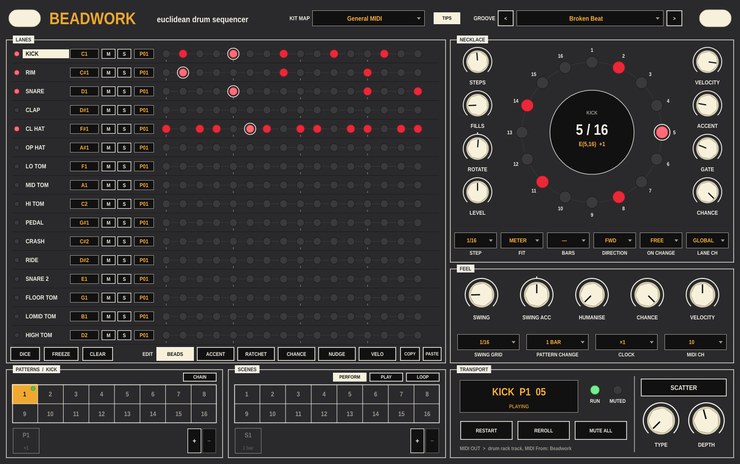
A Euclidean drum sequencer, built as a VST3 MIDI generator for Ableton
Live and as an Audio Unit MIDI effect for Logic Pro. Version 1.3.0.
Beadwork sends MIDI to a drum rack, or to Drum Machine Designer in Logic,
and follows your DAW's transport. Each of its sixteen lanes plays one
note, one per pad of a standard drum rack. You set how many steps a lane
has and how many hits to spread across them,
and Bjorklund's algorithm places the hits as evenly as possible. Three hits
in eight steps is the tresillo; five in sixteen, rotated, is the bossa nova
clave.
What it does
- Lanes
- STEPS (1 to 32), FILLS and ROTATE set each lane's figure. Each lane
also has its own clock division, direction, velocity, accent, gate and
chance, plus a MIDI note, mute and solo.
- Hand edits
- The EDIT bar picks what a click on a step does: add or remove a hit,
accent it, ratchet it (1 to 8 hits in one step), set its chance of
playing, nudge it early or late, or set its velocity. Edits stay where
they are when you change FILLS or ROTATE. FREEZE bakes them into the
figure.
- Polymeter and polyrhythm
- Lanes of different lengths drift against each other. FIT squeezes a
lane's steps into a set number of bars instead, so five steps can sit
against four.
- Patterns and chains
- Sixteen patterns per lane. A lane's chain plays patterns in order
with a repeat count for each, for example pattern 1 three times and then
a fill. Pattern changes land on the next bar, or whatever PATTERN CHANGE
is set to.
- Scenes
- Sixteen scenes, each storing which pattern every lane is on and which
lanes are muted. Click a scene to recall it, or put scenes in the scene
chain with a length in bars for each, and play it once or on a loop from
the start of the song.
- Scatter
- Ten types (stutter, reverse, half and double time, rolls, tape stop,
gate and more) at ten depths, modelled on the Scatter on Roland's TR-8S.
It changes what you hear, not the pattern. Tap SCATTER to latch it, or
hold it and it stops when you let go.
- Feel
- SWING, with a velocity offset for the swung note, HUMANISE, a global
CHANCE, a velocity trim and a CLOCK divider. The random parts repeat
exactly until you press REROLL.
- Kit maps and grooves
- A kit map holds each lane's label, MIDI note and channel; save one per
drum rack. A groove holds everything else. They save and load separately,
so any groove plays on any rack. Comes with General MIDI and chromatic
kit maps and nine grooves, starting with an empty one.
Each lane's pattern, mute and level can be automated, along with swing,
humanise and chance. Incoming MIDI passes through, so you can play the kit
from a keyboard at the same time.
The engine and pattern workflow are based on the Euclid mode of a
hardware step sequencer.
Video
Walkthrough video — not up yet.
Documentation
Download
Builds for macOS, Windows and Linux are on the
releases page.
Every archive includes the two PDF guides. There is no standalone version.
Logic Pro loads Audio Units rather than VST3, so it has its own
download: Beadwork MIDI FX, on the releases titled
Beadwork for Logic.
To install it, put Beadwork MIDI FX.component in
~/Library/Audio/Plug-Ins/Components and clear the quarantine flag:
xattr -dr com.apple.quarantine ~/Library/Audio/Plug-Ins/Components/"Beadwork MIDI FX.component"
Then add it to the MIDI FX slot of a Software Instrument track, in front
of Drum Machine Designer or Drum Kit Designer. The zip includes a short
text guide to using it in Logic.
Installation notes for the VST3 are on the front page.
Source
github.com/taddeimania/beadwork
— C++ and JUCE, AGPLv3.